
If you live in the Azure cloud space, you’ve probably noticed a new managed ruleset pop up in your Application Gateway WAF Policy called HTTP DDoS ruleset. If like me, you’ve wondered what it is, how it works and whether or not you should apply it – then read below and I will give a high level overview of my thoughts around it. This is a cool new feature; and it’s super simple to configure and turn on; it’s just a low hanging fruit to increase the security posture of your WAF.
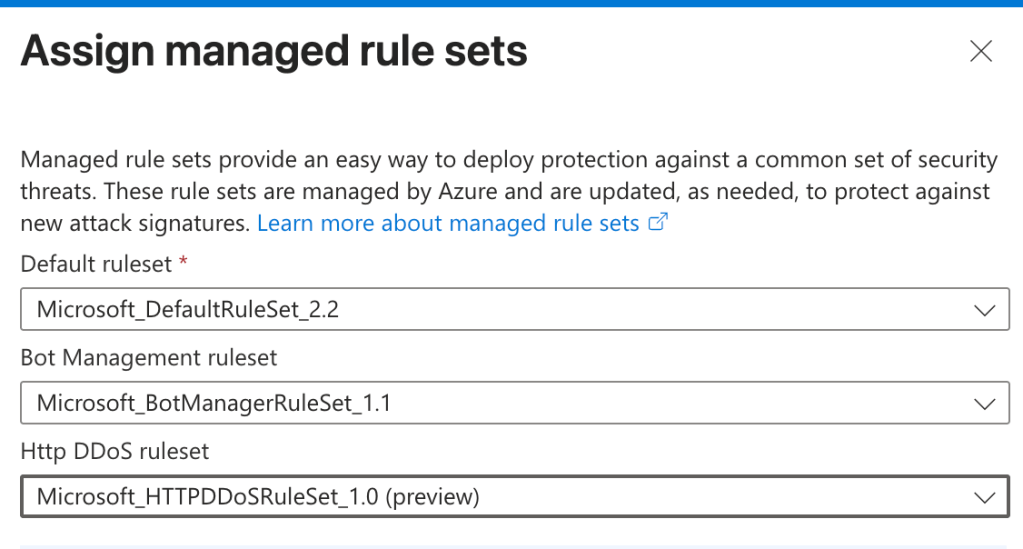
Firstly I’ll give an overview of the existing managed rulesets you can apply to an App Gateway WAF policy and how this new one differs. If we think about Application gateway as a protective layer that sits in front of our public web applications, the managed rulesets are what actually give our services protection by implementing checks against a set of well known attack detection rules. The main ruleset that you would typically apply is the OWASP (Open Worldwide Application Security Project) ruleset – which is a community-maintained set of attack-detection rules, where each rule is a pattern that inspects a HTTP request (URI, headers, body, cookies) for signatures of common attacks: SQL injection, cross-site scripting, remote code execution etc.
The other main ruleset (and the one that I recommend you apply) is Microsofts Default Rule Set (DRS) – which essentially takes the OWASP ruleset and layers Microsoft Threat Intelligence rules and false positive tuning on top. So you basically get the community ruleset with Microsofts additions on top.
What is a DDoS attack and why do people do it?
A Denial of Service attack tries to make a website or service unavailable by overwhelming it. The “distributed” in DDoS is the important part: the flood doesn’t come from one machine, it comes from thousands at once, usually a botnet of compromised devices spread across the globe. That distribution is what makes it hard to stop. You can’t just block a single IP address when the traffic is arriving from tens of thousands of them, many of which look like ordinary users.
DDoS attacks come in three broad shapes:
- Volumetric – brute-force flooding to saturate your bandwidth (the digital equivalent of jamming every phone line at once).
- Protocol – exhausting the connection state of firewalls and load balancers, for example by opening huge numbers of half-finished connections (SYN floods).
- Application layer (Layer 7) – sending requests that look legitimate (page loads, searches, logins) but at a volume designed to exhaust the application’s CPU, database, or memory. These are the hardest to spot because each request looks real.
The obvious question is; why do attackers do this? What’s the actual benefit? Some common motives:
- Smokescreen – The DDoS is a distraction while attackers quietly do something worse, like steal data, while your team is busy firefighting the outage.
- Extortion – A bad actor performing a DDoS attack on your environment and keeping you offline until you make some sort of payment to them.
- Sabotage – knocking a competitor or rival offline during a critical window (a product launch, a sale)
How Azure protects against DDoS
The defence is layered (defence in depth), because no single control covers every attack type.
Always-on Azure infrastructure protection – This protection is on by default if you deploy your applications in Azure. It is the protection applied to Azure’s entire cloud infrastructure that scrubs a lot of malicious traffic before they ever reach your application. You don’t turn anything on or configure it, it’s automatically applied. However; this protection is more about protecting Azure’s global infrastructure as a whole – to get protection at your own tenant level you will need to configure a more granular resource.
Azure DDoS Protection – This is a layer 3/4 defence for when bad actors try to hammer your cloud application with high volumes of network traffic. Layer 3/4 is the network layer so the attackers will hit your application with high volumes of UDP or TCP packets for example. It learns what your normal traffic looks like, detects deviations in real time, and mitigates automatically, with telemetry, alerting, and access to a rapid-response team during an active attack.
Earlier this year, Microsoft released in a preview a new form of DDoS protection that applies protection specifically at the web application layer; which you can easily apply to an Azure WAF policy called the HTTP DDoS Ruleset.
The new Azure WAF HTTP DDoS Ruleset
As of January 2026, Azure Application Gateway WAF now includes an HTTP DDoS Ruleset that shields your applications from large-scale, application-layer HTTP floods. Rather than relying on fixed rate limits or manual IP blocking, it learns what normal traffic looks like for your gateway and then mitigates anomalies automatically as they appear.
How it works: It watches request rates, not packets or payloads. For the first 24 hours after you turn it on, it just learns what normal traffic looks like for your gateway. After that, it works on two levels:
- Is the whole gateway getting more traffic than its learned normal? If not, it does nothing.
- Once the gateway as a whole is over its baseline, it looks at which individual IPs are above their normal, and throws those in a 15-minute “penalty box” (blocked, then released, re-blocked if they keep going).
That two-level check is what stops it blocking a few busy-but-legit users during a normal spike. It only goes after individual IPs when the gateway is genuinely under load.
Azure App gateway always had rate-limiting custom rules and bot protection which do mitigate HTTP floods, but they’re static: you set a fixed threshold and tune it by hand, and a clever distributed flood that stays just under your number slips through. So this new ruleset is a really cool feature as I had previously implemented rate limiting rules and it always felt like a bit of a guess as to what the best limits were. Too low and you block real users, too high and and malicious bot traffic doesn’t breach the threshold.
You can enable this feature by going into your WAF policy and assigning the Microsoft_HTTPDDoSRuleSet_1.0 (preview).
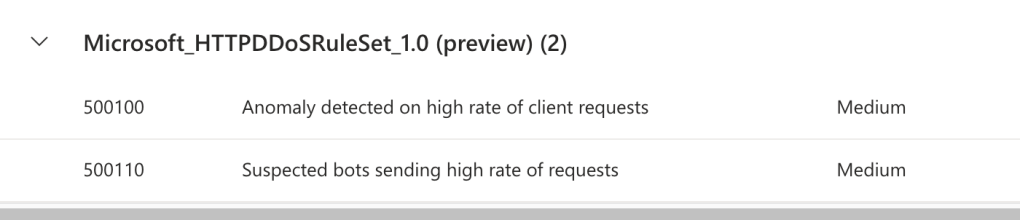
The ruleset is made up of two rules:
Rule 500100 – Anomaly detected on high rate of client requests: the general rule. It baselines all traffic to the gateway and flags any IP sending requests at an abnormally high rate once the gateway as a whole exceeds its learned normal. This is the catch-all for anyone flooding you.
Rule 500110 – Suspected bots sending high rate of requests: the narrower, stricter rule. It only watches traffic Microsoft Threat Intelligence has classified as bot activity, applies tighter thresholds than 500100 (since the traffic is already suspect), and blocks high-risk bots immediately. This is the sharper filter aimed at known-bad automated clients.
When you turn this on for the first time; the ruleset observes traffic for about 24 hours to establish a normal request pattern per gateway. After that baseline is established, any breaches of that threshold from offending clients are blocked and are placed in a “penalty box” for the defined time (15 minutes).
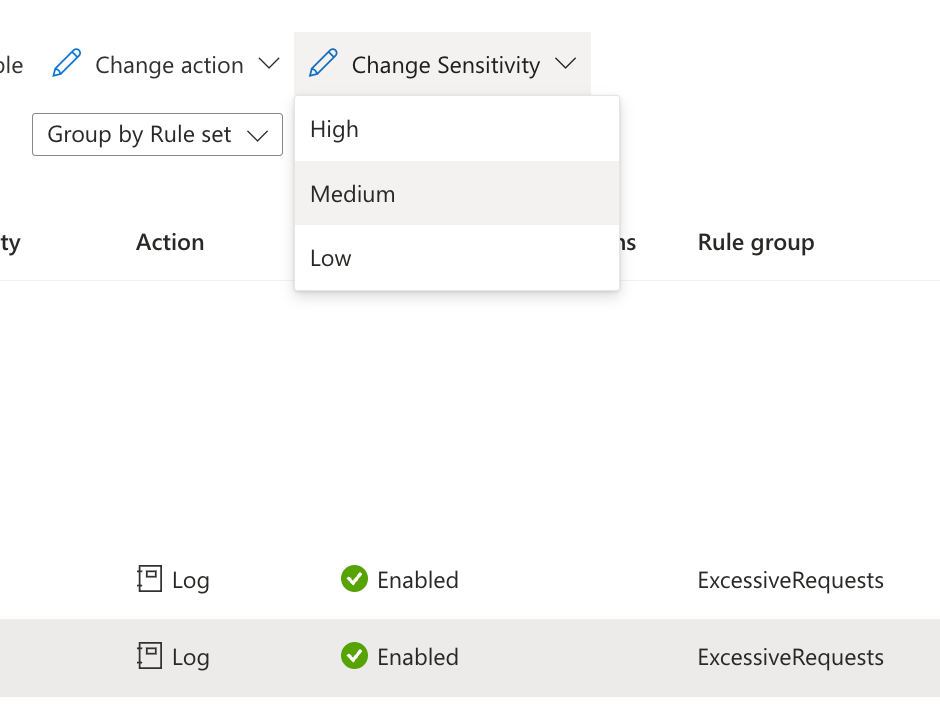
You can also change the sensitivity of the ruleset to low, medium or high. A low sensitivity applies a higher threshold to the baseline and a high sensitivity will apply a lower one (so it will block with less requests). Microsoft recommends setting it to Medium, which is also the default – but I have less of a tolerance to bots that Microsoft Threat Intelligence has classified as high risk so I actually set the 500110 rule sensitivity to low.
Important gotcha: It’s the first ruleset evaluated, before your custom rules. A custom Allow rule does not bypass it (an Allow rule bypasses every other WAF inspection, but not this one). During preview there’s also no way to exempt a specific IP from the ruleset or penalty box.
As always with these things; I would recommend enabling this with the Log action to see what would have actually been blocked after enabling it. You can then use the following KQL queries to see what traffic the new ruleset had detected and would have blocked:
Resource specific logs:
AGWFirewallLogs| where RuleSetType == "Microsoft_HTTPDDoSRuleSet"
Diagnostic logs:
AzureDiagnostics| where Category == "ApplicationGatewayFirewallLog"| where ruleSetType_s == "Microsoft_HTTPDDoSRuleSet"


Leave a Reply