
With the release of Bicep v0.38.3, comes a much desired feature going GA, which is the @onlyIfNotExists() resource decorator. This is a much requested feature that adds a clean way to skip deploying a resource if it already exists. This is a long awaited feature, and developers using bicep can implement this to increase the clarity and maintainability of their bicep code.
The @onlyIfNotExists decorator and how it works
The @onlyIfNotExists decorator in Bicep automatically checks for a resource’s existence before attempting deployment. If the Bicep engine finds the resource in the specified scope, it quietly skips the deployment; if not, it creates the resource. This elegant approach eliminates the need for complex conditional logic or existence checks, making your Bicep templates naturally idempotent.
As mentioned, this feature is currently GA for version v0.38.3 of bicep. To install the latest version, you can use the below cli command:
az bicep upgradeExample Usage using Azure API Management
I’ve personally been waiting for this feature to make my deployment of Azure API Management (APIM) with custom domains cleaner and more efficient. To demonstrate the use of this new decorator with my deployment, I will first give a bit of context.
During an enterprise deployment of APIM, you will typically want to deploy it with a custom domain to avoid using the default APIM gateway url when calling your API’s via the gateway. When setting this up you obviously need a certificate, and so typically these are stored within Azure Key Vault. This use case also can be applied for named values that you setup in APIM with references to Key Vault secrets. In order for APIM to use Key Vault as it’s certificate store for it’s custom domains, you need to give permission to APIM to access key vault, so let’s say you want to give the principal ID of APIM ‘Key Vault Secrets User’ access to your Key Vault. In order for the deployment to go ahead successfully, you obviously need to give the APIM identity access to key vault before you do your APIM deployment, otherwise how can it use the identity to access Key Vault for your deployment?
Well if you are experienced with Azure you will immediatly think this is a great use case for a User-Assigned Managed Identity, where we can create a User-Assigned Managed Identity, give it the relevant access to Key Vault, and then assign the Identity to APIM during the initial deployment. Great! Case closed…there’s only one problem. If your Key Vault firewall is enabled on your Key Vault, you cannot use User-Assigned identity’s for access from API Management.
If your have any mindset towards a secure architecutre then you will definietly have the firewall enabled on Key Vault and use secure networking when accessing it, so we are forced to use a System-Assigned Managed Identity. Therein lies the problem as this creates a chicken and egg problem. How can we assign the System-Assigned Managed Identity of APIM access to Key Vault before APIM has even been created so it does not fail during it’s initial setup?
A straightforward workaround is to use a two-step APIM deployment: the first run will fail when attempting to create the custom domain, but APIM itself and its System-Assigned Managed Identity will still be provisioned. We can then rerun the deployment, first assigning the necessary Key Vault RBAC roles to the APIM Managed Identity, and then redeploying APIM, which now succeeds in creating the custom domain with the required permissions in place. However, introducing failures into our pipelines or deployments is far from ideal, so it’s worth exploring a smarter, more seamless approach.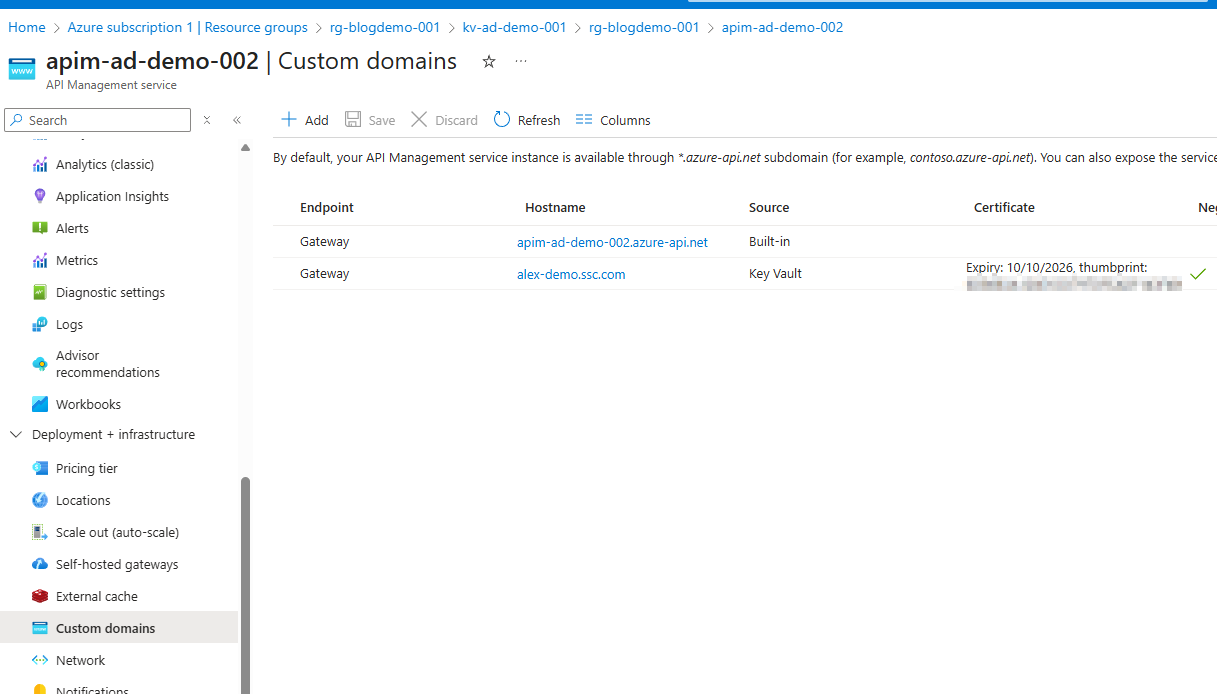
Previous Solution
For the past few years I have used the following approach. In my CI/CD pipeline fefore my deployment of APIM I would do a check to see if an APIM instance in the desired scope already existed. This would return True or False. I would then pass this parameter into the Bicep deployment and use it as a condition in the APIM deployment as follows.
PS1 script:
param(
    [Parameter(Mandatory=$true)]
    [string]$ResourceGroupName,

    [Parameter(Mandatory=$true)]
    [string]$ApimName
)

function Test-ApimExists {
    param (
        [string]$ResourceGroupName,
        [string]$ApimName
    )

    $apim = az apim show --name $ApimName --resource-group $ResourceGroupName 2>$null

    if ($apim) {
        Write-Host "APIM '$ApimName' exists in resource group '$ResourceGroupName'"
        return $true
    } else {
        Write-Host "APIM '$ApimName' does not exist in resource group '$ResourceGroupName'"
        return $false
    }
}

# Call the function
Test-ApimExists -ResourceGroupName $ResourceGroupName -ApimName $ApimName
Bicep:
param existingApim = (apimExists == 'true') ? true : false
param hostnameConfigurations array =  []

resource apimService 'Microsoft.ApiManagement/service@2023-03-01-preview' = {
  name: apimServiceName
  location: location
  sku: {
    name: 'Developer'
    capacity: 1
  }
  identity: {
    type: 'SystemAssigned'
  }
  properties: {
    publisherEmail: publisherEmail
    publisherName: publisherName
    hostnameConfigurations: existingApim ? hostnameConfigurations : []
  }
}
This means that we will only attempt to create the APIM custom domains if the APIM already exists and thus has the required permissions. This has worked pretty seamlessly but now with the @onlyIfNotExists decorator we can clean this up a bit.
New Solution
Below is a simple bicep implementation using the new decorator. We will split out the APIM init deployment code and the custom domain code as unfortunately the decorator can only be applied to bicep resources and not modules.
Our main.bicep will look like the following:
@description('The name of the API Management service')
param apimServiceName string

@description('The location for all resources')
param location string = resourceGroup().location

@description('The custom domain hostname')
param customDomainHostname string

@description('The name of the existing Key Vault')
param keyVaultName string

@description('The name of the certificate in Key Vault')
param certificateName string

@description('The email address of the API Management service administrator')
param publisherEmail string

@description('The name of the API Management service organization')
param publisherName string

// Deploy API Management service
module apimService 'apim--init.bicep' = {
  name: 'apim-001-init'
  params: {
    publisherEmail: publisherEmail
    publisherName: publisherName
    apimServiceName: apimServiceName
    keyVaultName: keyVaultName
  }
}

module apimService_custom_domain 'apim-custom-domain.bicep' = {
  name: 'apim-002-custom-domain'
  dependsOn: [
    apimService
  ]
  params: {
    publisherEmail: publisherEmail
    publisherName: publisherName
    apimServiceName: apimServiceName
    hostnameConfigurations: [
      {
        type: 'Proxy'
        hostName: customDomainHostname
        keyVaultId: 'https://${keyVaultName}.vault.azure.net/secrets/${certificateName}'
        defaultSslBinding: true
        certificateSource: 'KeyVault'
        negotiateClientCertificate: true
      }
    ]
  }
}
Our apim-init.bicep will be the following:
@description('The name of the API Management service')
param apimServiceName string

@description('The location for all resources')
param location string = resourceGroup().location

@description('The email address of the API Management service administrator')
param publisherEmail string

@description('The name of the API Management service organization')
param publisherName string

@description('The name of the existing Key Vault')
param keyVaultName string

param hostnameConfigurations array =  []

// Get reference to existing Key Vault
resource keyVault 'Microsoft.KeyVault/vaults@2023-02-01' existing = {
  name: keyVaultName
}

@onlyIfNotExists()
resource apimService 'Microsoft.ApiManagement/service@2023-03-01-preview' = {
  name: apimServiceName
  location: location
  sku: {
    name: 'Developer'
    capacity: 1
  }
  identity: {
    type: 'SystemAssigned'
  }
  properties: {
    publisherEmail: publisherEmail
    publisherName: publisherName
    hostnameConfigurations: hostnameConfigurations
  }
}

@onlyIfNotExists()
resource keyVaultRoleAssignment 'Microsoft.Authorization/roleAssignments@2022-04-01' = {
  name: guid(keyVault.id, apimServiceName, 'Key Vault Secrets User')
  scope: keyVault
  properties: {
    roleDefinitionId: subscriptionResourceId('Microsoft.Authorization/roleDefinitions', '4633458b-17de-408a-b874-0445c86b69e6') // Key Vault Secrets User role
    principalId: apimService.identity.principalId
    principalType: 'ServicePrincipal'
  }
}

@onlyIfNotExists()
resource keyVaultCertRoleAssignment 'Microsoft.Authorization/roleAssignments@2022-04-01' = {
  name: guid(keyVault.id, apimServiceName, 'Key Vault Certificates User')
  scope: keyVault
  properties: {
    roleDefinitionId: subscriptionResourceId('Microsoft.Authorization/roleDefinitions', 'a4417e6f-fecd-4de8-b567-7b0420556985') // Key Vault Certificates User role
    principalId: apimService.identity.principalId
    principalType: 'ServicePrincipal'
  }
}


output apimServiceId string = apimService.id
output apimServicePrincipalId string = apimService.identity.principalId
output apimServiceNameOutput string = apimService.name
Here we can see that the decorator are applied to all 3 resource deployments. This means that it will deploy this the first time, but then won’t overwrite the custom domains by deploying it again if the same bicep is called.
Finally our apim-custom-domain.bicep:
@description('The name of the API Management service')
param apimServiceName string

@description('The location for all resources')
param location string = resourceGroup().location

@description('The email address of the API Management service administrator')
param publisherEmail string

@description('The name of the API Management service organization')
param publisherName string

param hostnameConfigurations array =  []

resource apimService 'Microsoft.ApiManagement/service@2023-03-01-preview' = {
  name: apimServiceName
  location: location
  sku: {
    name: 'Developer'
    capacity: 1
  }
  identity: {
    type: 'SystemAssigned'
  }
  properties: {
    publisherEmail: publisherEmail
    publisherName: publisherName
    hostnameConfigurations: hostnameConfigurations
  }
}


output apimServiceId string = apimService.id
output apimServicePrincipalId string = apimService.identity.principalId
output apimServiceNameOutput string = apimService.name
Here we can see that I am setting the custom domain in the hostnameConfigurations with no conditions needed.
And that’s about it. This is a really rough example but I have tested the above implementation and it works perfectly.
A final cool note
Something I haven’t seen highlighted in other articles about this new feature is that you can still retrieve outputs from resources skipped with the @onlyIfNotExists() decorator. At first, I assumed this might cause dependency issues in Bicep code when referencing outputs from a decorated resource, but that’s not the case. Looking at the deployment outputs in Azure for my apim-001-init deployment, the outputs are still present.
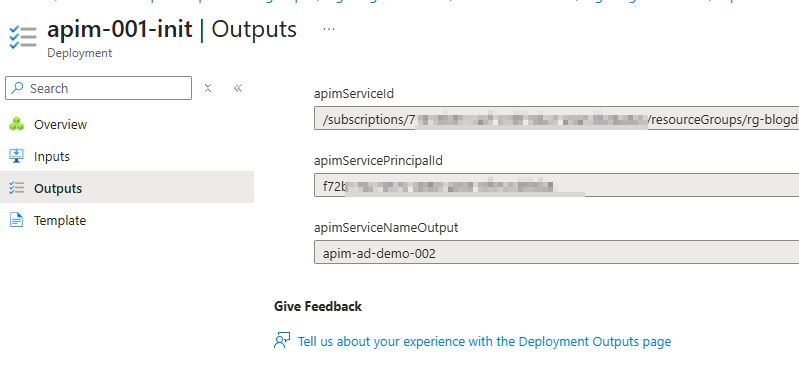
This is great because it shows that the deployment itself isn’t skipped—only the resource creation is. In effect, it behaves like using the existing keyword when declaring a Bicep resource. It’s a neat capability that helps avoid potential headaches or hidden gotchas this feature might otherwise have introduced.

 Alex D'Antico Tech
Leave a comment