
GitHub Solution: https://github.com/AddEleven/apim-oauth
When first implementing Azure API Management (APIM), the default approach is often using subscription keys for client authentication.
You might start with the built-in all-access subscription key, then graduate to creating specific products with dedicated subscription keys for better access control. If you’re feeling extra fancy, you might even store these keys in Azure Key Vault, allowing your client applications to retrieve them securely.
The authentication approach could look something like the following: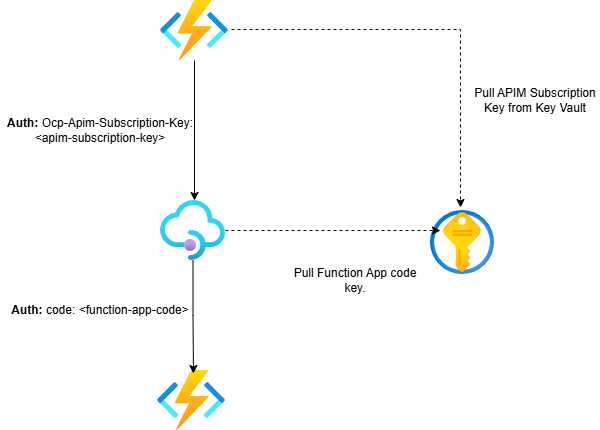
However, while API keys are an okay starting point, modern cloud architectures demand more sophisticated, passwordless authentication solutions. Enter the world of Azure Managed Identities and OAuth 2.0.
OAuth 2.0 client credentials flow
The Client Credentials flow provides a secure authentication mechanism for server-to-server scenarios where your application needs to authenticate itself (rather than a user) to access backend resources. This is the recommended approach for secure server-side application authorisation. There are several ways we can implement this:
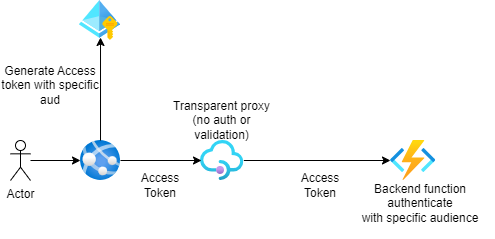
Direct Backend Authorization Approach
- Your client application requests access tokens directly from the authorization server and presents them in the authorization header when calling your API gateway
- API Management functions as a transparent proxy, passing the token unchanged to your backend API
- Security is enhanced through validate-jwt or validate-azure-ad-token policies that reject requests with missing or unauthorized tokens
- The access token scope exists solely between the calling client application and your backend API
API Management as an Authorization Proxy
- Delegation of Authority: API Management service acts on behalf of your backend APIs, allowing client applications to request access directly to the API Management gateway.
- Secure Backend Connection: The connection between API Management gateway and your backend APIs is secured through separate mechanisms such as function keys, certificates, or managed identities.
- Streamlined Token Scope: Access tokens are scoped between the calling client application and the API Management gateway only, simplifying your security architecture.
This approach is particularly valuable for standardizing your authorization strategy. Organizations with diverse backend APIs (each potentially using different authentication mechanisms) can implement a consistent OAuth 2.0 authorization layer at the API Management level, creating a unified security experience for API consumers.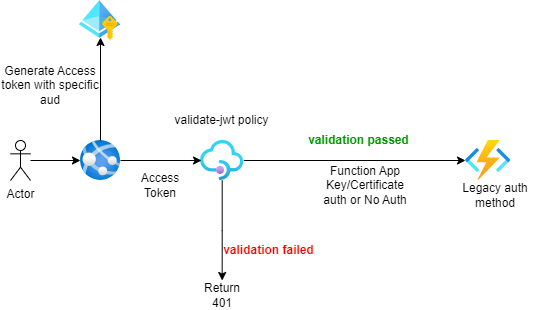
API Management Handles Backend Authorization
- Centralized Credential Management: Using managed connections, Azure API Management securely stores and manages credentials for your backend services. This simplifies authentication to OAuth 2.0-compatible services like LinkedIn, GitHub, and other SaaS platforms.
- Simplified Gateway Security: Client applications make requests to your API Management gateway where access is controlled through identity providers or other client-side authentication mechanisms.
- Delegated Authentication: Through policy-based configuration, your client applications delegate the complexity of backend authentication and authorization to API Management, creating a cleaner separation of concerns.
This approach creates a consistent security boundary while keeping authentication logic out of your client applications.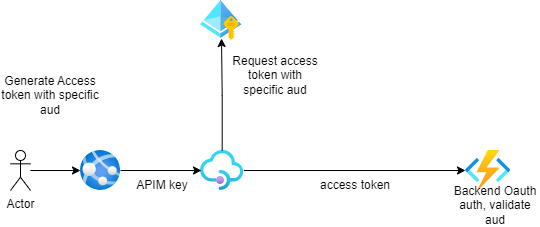
Managed Identity Authentication
- Authenticate to backend service using a managed identity.
- Use the managed identity to obtain an access token from Entra ID for accessing the specified resource.
- Can either authenticate from the API Management service using the authentication-managed-identity policy, using the System-Assigned or User-Assigned managed identity of APIM or can authenticate from the client app using the client app’s System-Assigned or User-Assigned managed identity
My Approach
With these in mind, I want to set up an authentication workflow that combines all these different approaches. While implementing everything at once might be overkill, it should be fun for this testing. The key focus? Creating a completely passwordless system by authenticating our backend services using Azure Managed Identities.
I want to make this approach as secure as possible and I want as minimal secrets or credentials set up as possible. I also want different layers to my authentication approach, so I have gone with something like the below: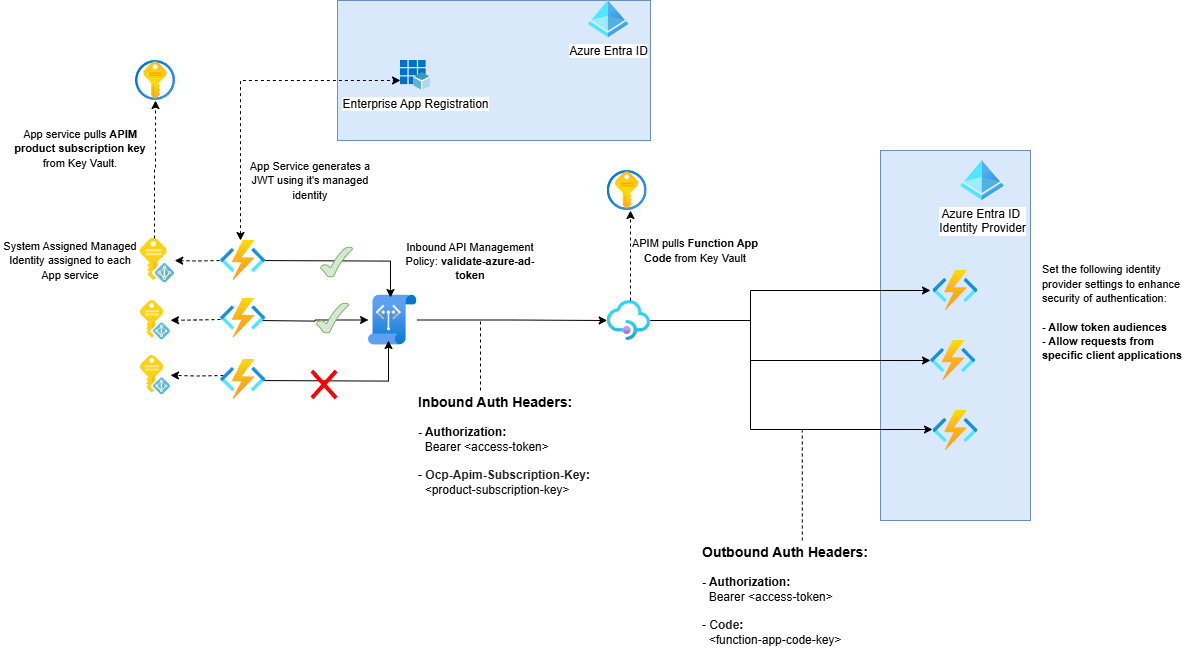
- Frontend Function App Gets Access
The Frontend Function App uses its Managed Identity to:- Request an access token for the backend API from Microsoft Entra ID
- Fetch the APIM subscription key from Key Vault
No secrets needed – it’s all handled by the Managed Identity.
- Making the API Call
The Frontend Function App calls APIM with two headers:- Authorization: Bearer {access_token}
- Ocp-Apim-Subscription-Key: {subscription_key}
- APIM Token Validation
APIM’s inbound policy validates the token usingvalidate-azure-ad-token. It checks:- Is this a valid Bearer token from Microsoft?
- Is the token meant for our API (audience check)?
- Does it have the right claims (optional)?
Here’s what the policy looks like: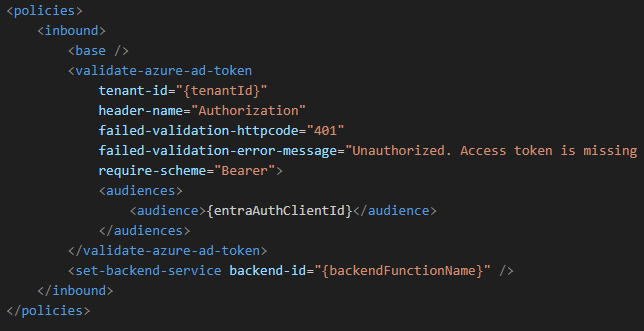
- APIM to Backend Communication
If validation passes, APIM forwards the request to the backend with:- The original access token
- Function app code (pulled from Key Vault using APIM’s Managed Identity)
- Backend Authorization
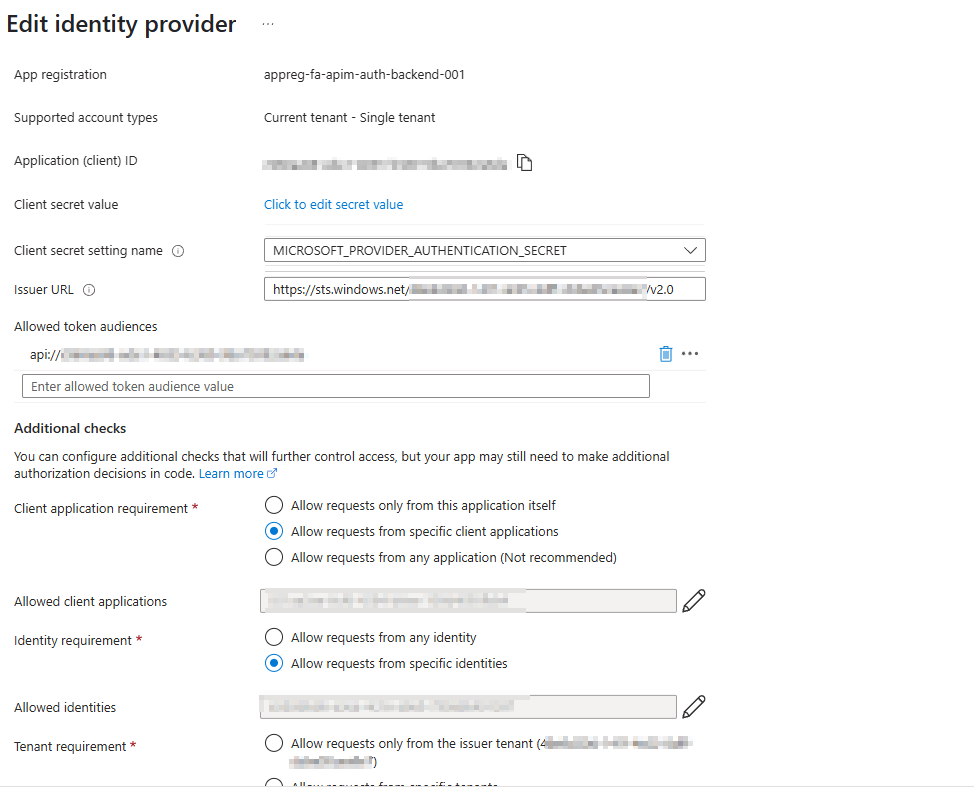
The request to the backend server is authenticated using Microsoft Entra authentication. The authentication is configured to only allow requests from:- My specific Entra Tenant
- My specific client Application ID and Object ID
As an extra feature we can start experimenting with App roles and API permissions. This gives a more granular approach to the permissions that a client app has on a backend app by:
- Create different roles for different API operations
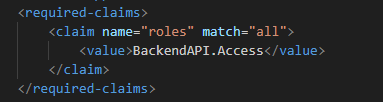
- Validating permissions at the APIM layer using the
required-claimsparameter on the apim inbound policy.
The implementation steps for this:
- Creating App Roles: First, we define roles in our backend API’s app registration. I’ve started with a simple read-only role, but you can expand this based on your needs.
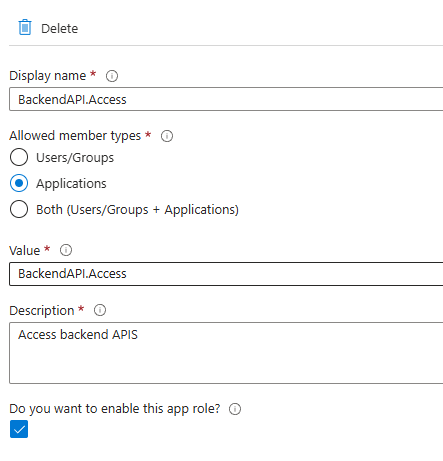
You will need to grant admin consent when creating this app role. - Assigning Roles: The crucial step is assigning these roles to our frontend Function App’s Managed Identity. This creates the permission link between our services.
In order to assign app role to a managed identity it has to be done via the cli or PowerShell. A Microsoft document with an example on how to do this can be found here:- Navigate to Microsoft Entra ID in the portal
- Find the Enterprise Application.
- Go to “Enterprise applications”
- Search for your managed identity (it will appear as an enterprise app)
- Click on the managed identity from the search results
- View the Permissions:
- In the left menu, click on “Permissions”
- Here you should see the permission for your app role created earlier.
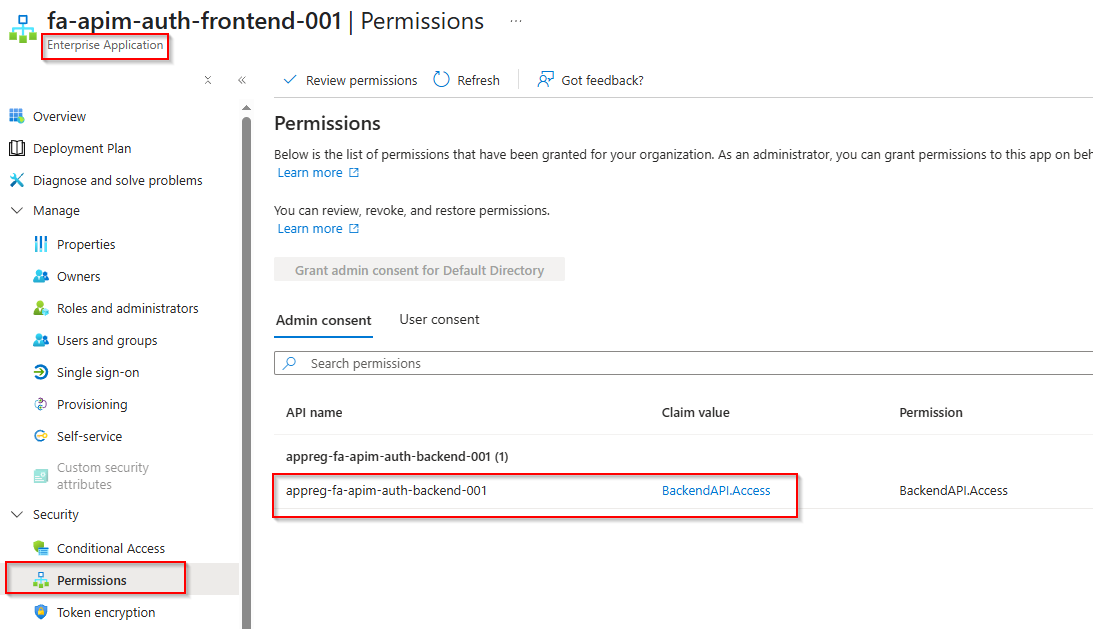
- Validation in APIM: Finally, we validate these roles in our APIM policies. This ensures that every request not only comes from an authenticated source but also has the right permissions. An example policy segment is below:
JWT Helpful Notation
By using a site like https://jwt.io/ , we can decode our access token to see the values that have been passed through. An example below: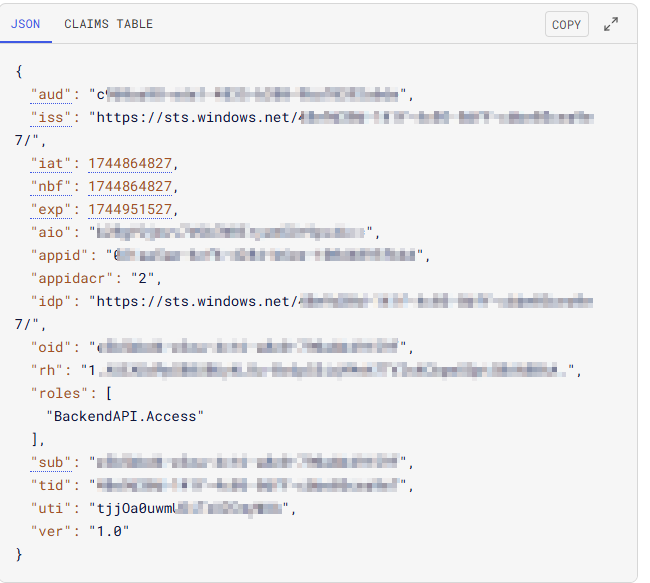
| Field | Obtained From | Notes |
| aud | DefaultAzureCredential().get_token(scopes:str) | This is the client ID of the app registration used to setup the backend auth. This defines the target resource which you want to access. |
| iss | The issuer of the JWT. | In our case it is the Entra sts.windows.net provider with our Entra tenant-id. |
| azp | This is the authorised party parameter. This maps to the Application ID of our requesting client App. In our case it is the managed identity of the azure function client app. | In the backend function app, this is the allowlist of string application client IDs that represent the client resource that calls into the app. |
| oid | This maps to the Object ID of our requesting client App. In our case it is the managed identity of the azure function client app. | In the backend function app, this is the an allowlist of string object IDs that represent users or applications that have access |
| roles | Obtained from App Role assigned to frontend Managed Identity. Parsed in as an array. | This is the App Role created on the App Registration used for Backend Entra Authentication. |
My GitHub Solution
I’ve created a demo project that showcases how to implement passwordless service-to-service authentication in Azure. The solution uses Azure Functions, API Management, and Managed Identities to demonstrate secure communication without storing any secrets.
What’s in the Project
The solution consists of:
- A Python frontend Function App that makes authenticated calls
- An API Management instance that validates tokens and routes requests
- A Python backend Function App protected by Microsoft Entra ID
- Infrastructure as Code (Bicep) for automated deployment
- GitHub Actions pipeline for CI/CD
How It Works
- The frontend Function App uses its Managed Identity to get tokens and keys
- APIM validates the authentication and routes requests
- The backend Function App processes authenticated requests
- Everything is deployed automatically via GitHub Actions
Key Features
- Zero stored secrets or connection strings
- Multiple layers of security
- Complete infrastructure as code
- Automated deployment
- Token validation at multiple levels
- Role-based access control
The complete solution is available on GitHub, where you’ll find all the code, deployment scripts, and documentation needed to implement this pattern in your own projects.
You can find the code at: https://github.com/AddEleven/apim-oauth
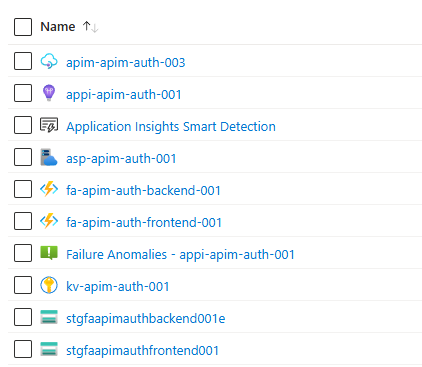
Once deployed, you should see the following:
- The following Azure resources, including an API Management instance, backend and frontend function apps, key vault, app insights and others.
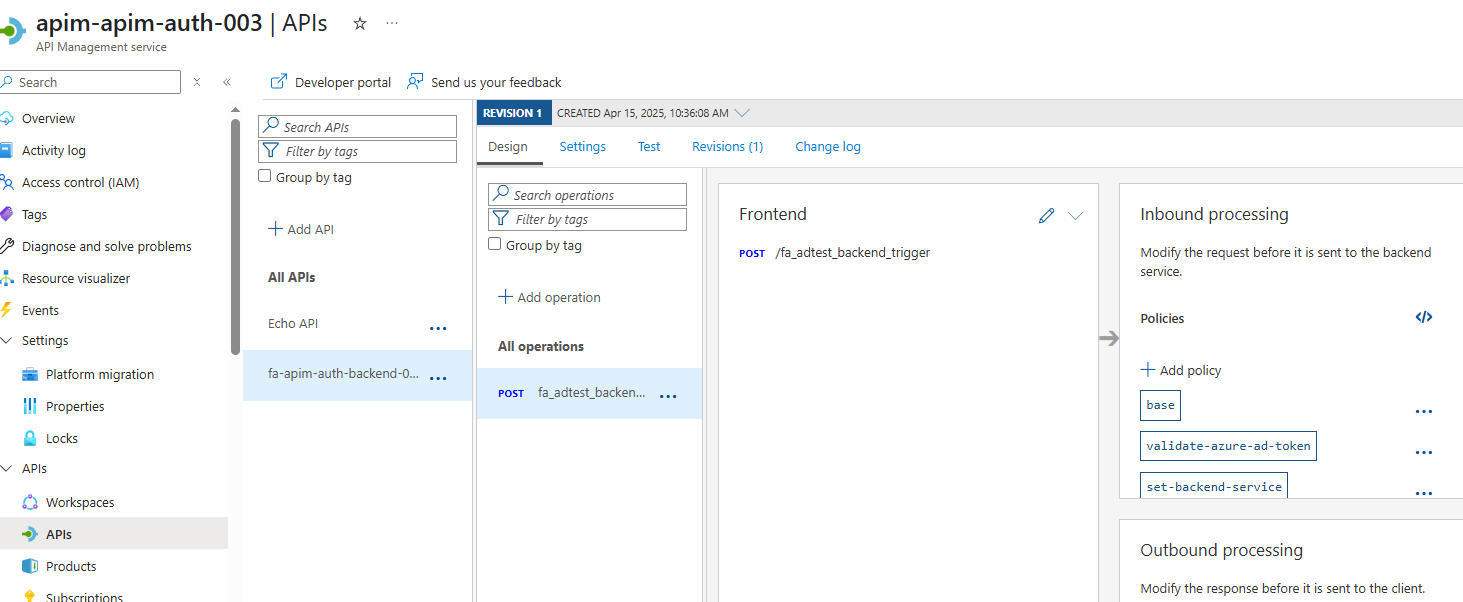
- In APIM, you should see our Function App Backend API, with all the backend config, named values and policies configured to allow this auth process to work:
- Importantly, if you go to the
Backend Function App, under:
settings > authentication, you will see our Microsoft enabled Identity provider: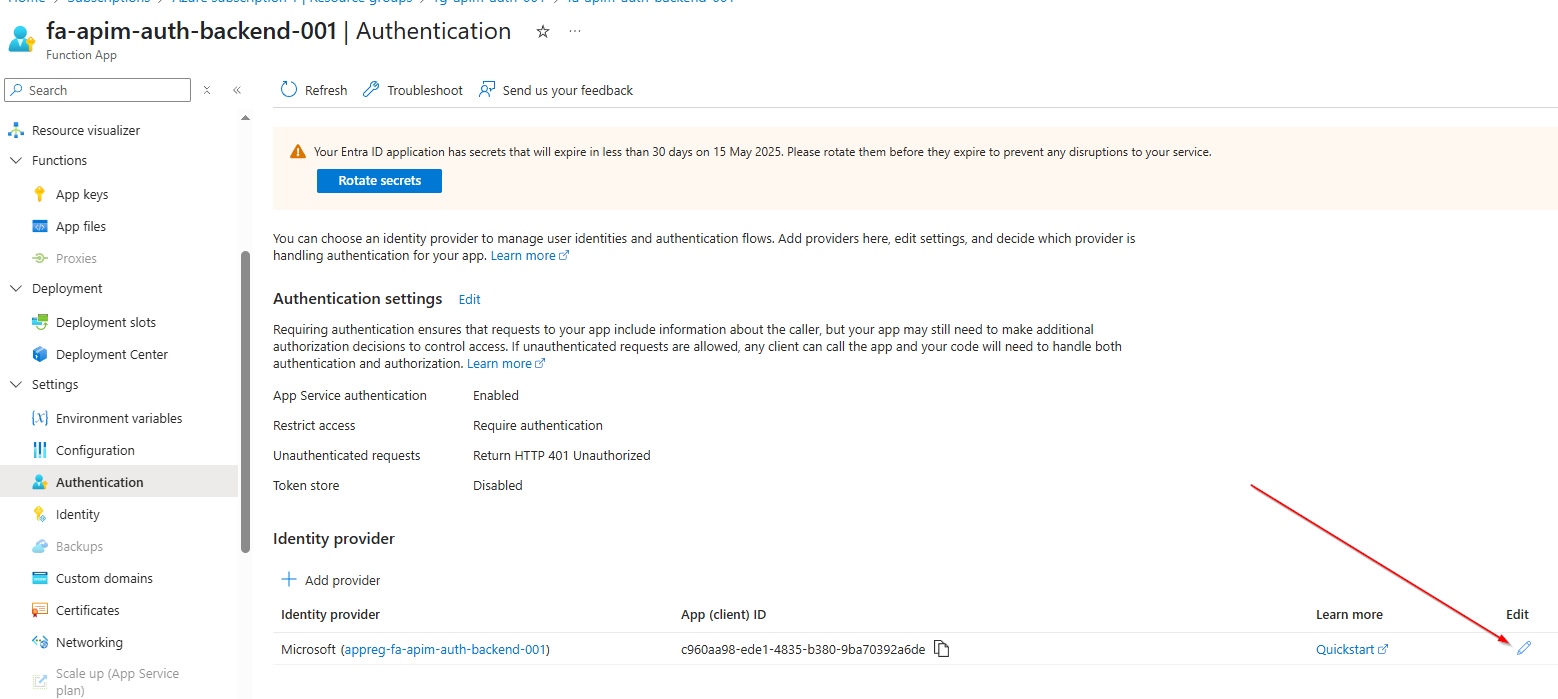
- If you Select Edit, you can see further details like the Application ID’s and Identities that we’ve enabled as well as our Issuer URLs:
You can test the entire auth functionality by going into the frontend function app and testing/running the function (from the portal or any API tool that you have). If successful, you should get a 200 OK HTTP response code: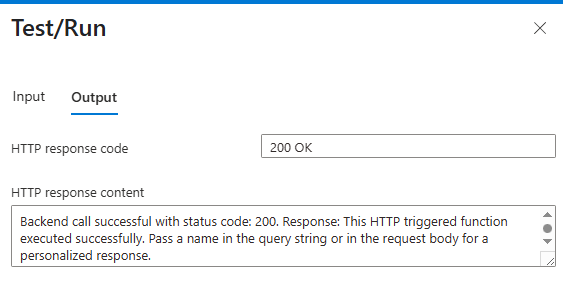
WARNING: Because this is a POC/testing workflow I am logging the Access token that the frontend app generates. Be sure to remove this if you use this in any client/production scenarios.
Pros and Cons of This Approach
Pros:
- True Passwordless Authentication
- Eliminates need for stored secrets in service-to-service communication
- Reduces security risks associated with credential management
- Granular Access Control with JWTs
- Fine-grained privilege control through audience and role claims
- Multiple validation layers:
- Token validation in APIM
- Backend Function App authorization
- Additional security through APIM subscription keys
Challenges to Consider:
- Role Membership Propagation Delay
- Managed identity tokens are cached for ~24 hours
- Role changes can take hours to propagate
- No manual token refresh capability
- Unlike user tokens, can’t force immediate updates
- Token Lifecycle Management
- Access tokens cannot be revoked once issued
- OAuth 2.0 client credentials flow relies solely on access tokens
- Token lifetime must be carefully configured based on security requirements
- Local Development Complexity
- Traditional subscription key-only authentication no longer works
- Need to consider:
- Developer portal setup
- Local development workflows
- Testing strategies
Conclusion
This solution took a bit longer than expected to create and this blog post turned out to be a bit of a word vomit so I’m going to end it here because I want to do other stuff; so the repo is a bit of a mess, but again this solution is only for a proof of concept. Hopefully you get some use out of this post and/or the GitHub solution.
Funny story: It took me over a day of troubleshooting to be able to deploy the azure-identity python package to my function app; check my StackOverflow question for reference: https://stackoverflow.com/questions/79561318/github-action-deploy-python-to-azure-function-import-azure-identity-not-work

 Alex D'Antico Tech
Leave a comment