
Azure Role-Based Access Control (RBAC) is a critical aspect of managing access to your resources in Azure. RBAC helps you manage who has access to Azure resources, what they can do with those resources and what areas they have access to.
Recently, I encountered a situation in our Azure tenant where a role assignment was made, but we couldn’t determine who set it, when it was set, or why. While retrieving existing role assignment information is straightforward through the Access Control (IAM) section of a subscription, resource group, or resource, obtaining detailed information about these role assignments requires a different approach.
Azure Log Analytics: A Solution for RBAC Activity Tracking
To leverage Azure Log Analytics for RBAC activity tracking, we firstly need to add a diagnostic setting to export activity logs into a log analytics workspace. To do this, do the following:
- Navigate to Monitor and select Activity Logs.
- Click on Export Activity Logs.
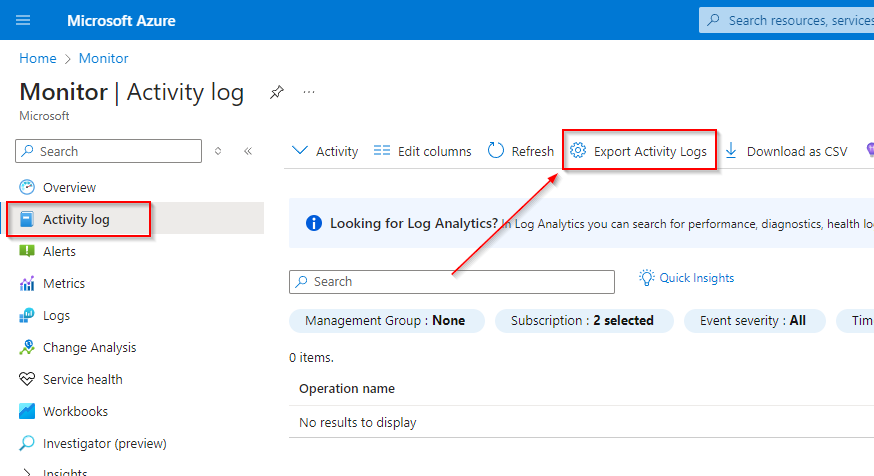
- From here select +Add Diagnostic Setting.
- Under logs, enable Administrative logs and choose a Log Analytics workspace from the available options.
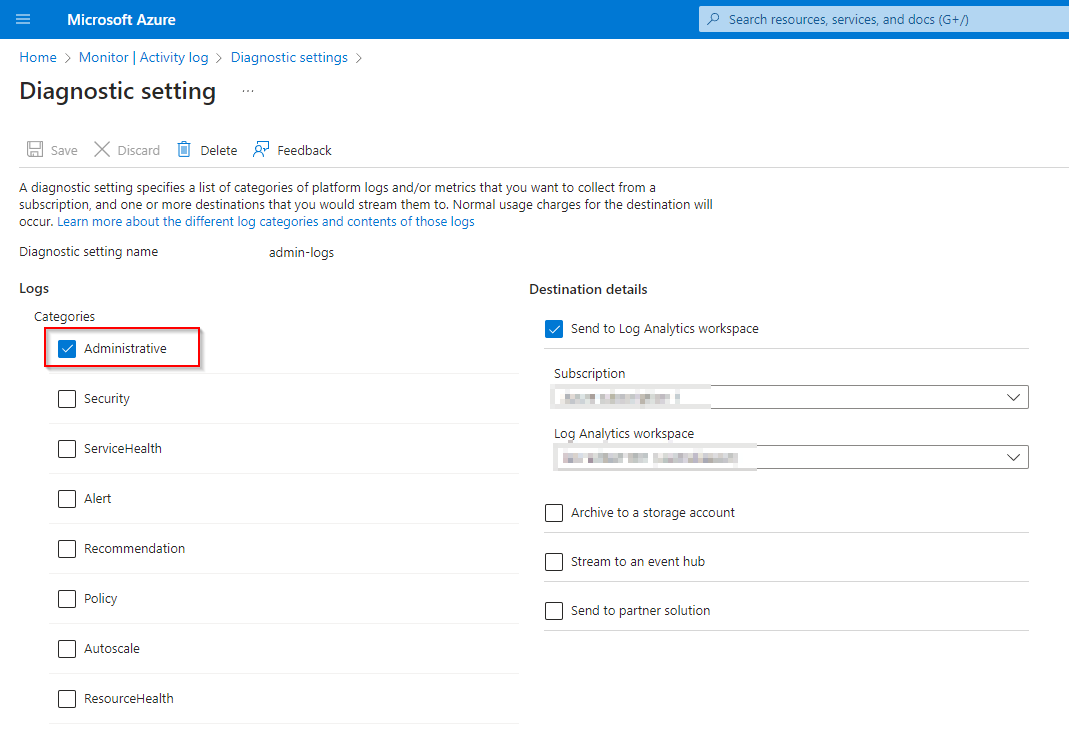
Once completed, Azure RBAC activities will start appearing in the selected Log Analytics workspace.
Querying Azure RBAC Activities in Log Analytics Workspace
With the diagnostic setting in place to monitor Azure RBAC activities, we can now use Kusto Query Language (KQL) to query the Log Analytics Workspace tables and obtain detailed information about these activities.
Navigate to your Log Analytics workspace and select Logs from the left-hand pane. The data we need to query is stored in the AzureActivity table. Below are some useful queries that I use to analyze RBAC activity.
- Basic Query for Role Assignments
This query retrieves all role assignment activities, providing a general overview of role assignments within your Azure environment.
AzureActivity
| where OperationNameValue contains 'MICROSOFT.AUTHORIZATION/ROLEASSIGNMENTS'
| project TimeGenerated, OperationNameValue, ResourceId, Caller, ActivityStatusValue, Properties- Role Assignments Created
This query filters the role assignment activities to show only those where new role assignments were created. It helps identify when and where new roles have been assigned, along with the associated details. You can do the same query for Role Assignments that were deleted by swapping /WRITE with /DELETE.
AzureActivity
| where OperationNameValue == 'MICROSOFT.AUTHORIZATION/ROLEASSIGNMENTS/WRITE'
| project TimeGenerated, ResourceId, Caller, ActivityStatusValue, Properties- Detailed Role Assignment Changes
This is where we can start doing some cool stuff with KQL. You will notice that with these queries, the useful information to us (like Scope, Principal Id and Role definition) is nested deep within the Properties > requestbody > Properties data. The below query extracts this data, allowing it to be easily viewable whilst also providing the ability to easily query on that particular information.
AzureActivity
| extend scope = parse_json(tostring(Authorization)).scope
| extend RoleDefinitionId_ = tostring(parse_json(tostring(parse_json(tostring(parse_json(Properties).requestbody)).Properties)).RoleDefinitionId)
| extend PrincipalId_ = tostring(parse_json(tostring(parse_json(tostring(parse_json(Properties).requestbody)).Properties)).PrincipalId)
| extend Scope = tostring(parse_json(tostring(parse_json(tostring(parse_json(Properties).requestbody)).Properties)).Scope)
| extend resource_ = tostring(parse_json(Properties).resource)
| where ActivityStatusValue == 'Start' and OperationNameValue contains 'MICROSOFT.AUTHORIZATION/ROLEASSIGNMENTS'
// | where PrincipalId_ == ''
// | where Scope == ''
| summarize by Caller, CategoryValue, Level, OperationNameValue, ActivityStatusValue, RoleDefinitionId_, PrincipalId_, Scope
This will give us records like below: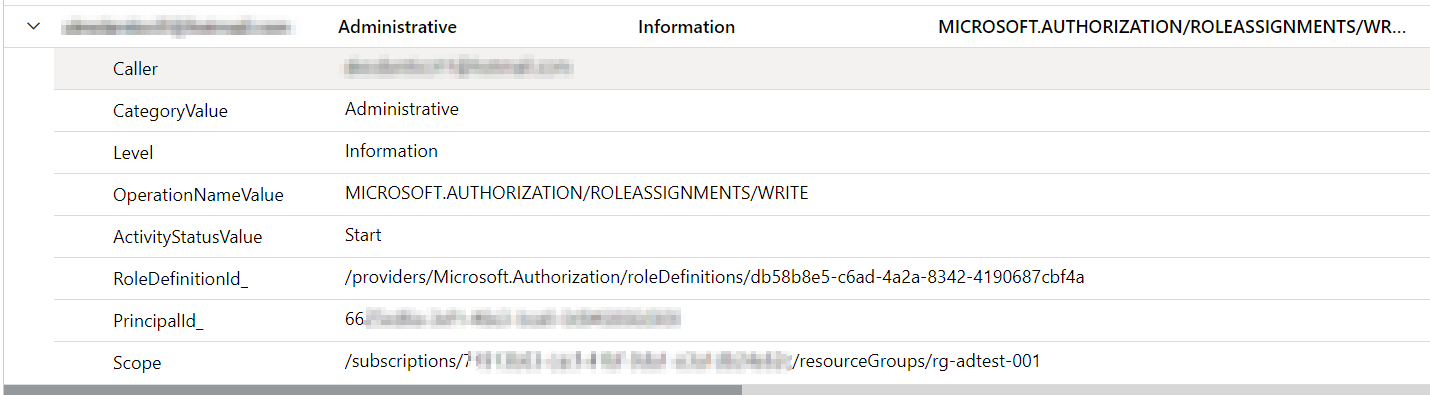
In the query, the PrincipalId_ and Scope filters are commented out. You can uncomment these lines and add specific values to filter the results based on particular Principal Ids or Scopes.
Listing Role Assignments with Associated IDs
The RoleDefinitionId value obtained from the query above isn’t very useful on its own unless you can map it to the corresponding role name. Below is a handy Azure CLI command that retrieves all Role Definition IDs within an Azure Tenant along with their corresponding names:
az role definition list --query "[].{RoleDefinitionName:roleName, RoleDefinitionId:name}"This command will return a list of roles, which you can use as a reference to map Role Names to their Role Definition IDs.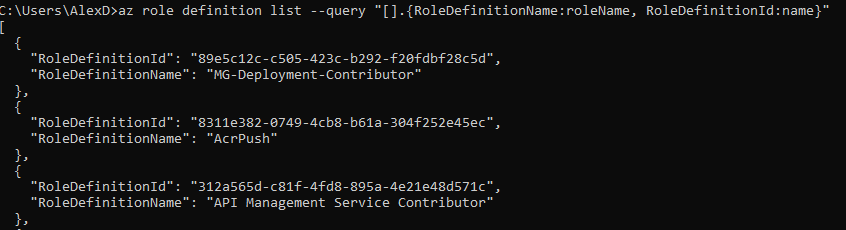


 Alex D'Antico Tech
Leave a comment