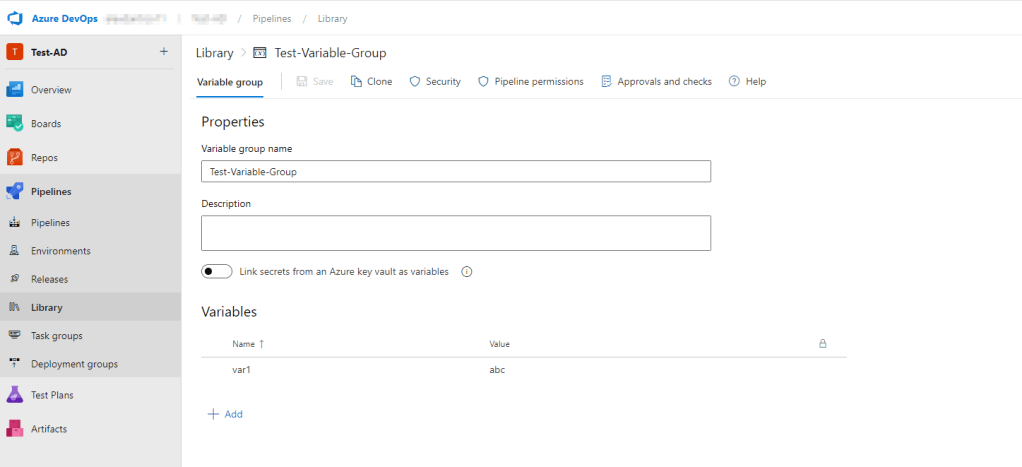
A useful tool in Azure DevOps is the Library Variable Group, which allows you to store and manage reusable pieces of data, such as variables and secrets, that can be used across multiple pipelines in your project.
Unfortunately Azure DevOps doesn’t provide a built-in feature to export variables from a Library Group from the UI. Exporting your Library Group can be useful in a variety of scenarios, such as migrating variables to another project or backing up your variables for safekeeping.
In this blog post, I’ll a provide a method that you can use to retrieve and export your Library Group variables using the Azure DevOps REST API.
Authenticating with Azure DevOps
Firstly, we need a way to authenticate to our Azure DevOps organisation. To do that, we will use a Personal Access Token (PAT).
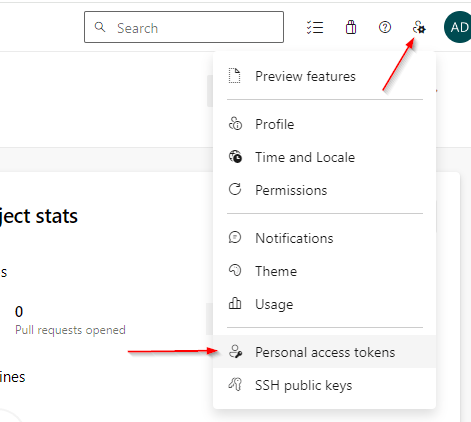
In your Azure DevOps organisation, select User Settings in the top right of the screen, then select Personal access tokens.
In the next screen, configure your PAT as follows:
1. Give your PAT a Name.
2. Set the Organization where your Library Variable group lives.
3. Set the desired Expiration. Because I’m just going to use this to run a script once, I usually set this to expire the next day.
4. Give the Variable Groups Scope Read permissions.

Finally select Create. The next screen should say Success and give you your PAT to copy. Copy this to your clipboard and store it somewhere secure because we’ll need it for the next step.
Exporting Variables
Run the below script using Powershell.
# Define your Azure DevOps organization, project, and personal access token
$organization = "https://dev.azure.com/<your-organization>"
$project = "<your-project>"
$pat = "<your-personal-access-token>"

# Define the name of the variable group
$variableGroupName = "<your-variable-group-name>"

# Convert the personal access token to a Base64 string
$base64AuthInfo = [Convert]::ToBase64String([Text.Encoding]::ASCII.GetBytes(":$($pat)"))

# Get all variable groups
$response = Invoke-RestMethod -Uri "$organization/$project/_apis/distributedtask/variablegroups?api-version=6.1-preview.2" -Method Get -Headers @{Authorization="Basic $base64AuthInfo"}

# Find the variable group with the specified name
$variableGroup = $response.value | Where-Object { $_.name -eq $variableGroupName }

# Check if the variable group was found
if ($variableGroup -eq $null) {
    Write-Output "Variable group not found"
    exit
}

# Get the variables from the variable group
$variables = $variableGroup.variables

# Export the variables to a JSON file
$variables | ConvertTo-Json | Out-File -FilePath "$variableGroupName.json"
In this script, replace your-organization, your-project, your-personal-access-token, and your-variable-group-name with your Azure DevOps organization, project, personal access token, and variable group name, respectively.
This script first fetches all variable groups in the project, then filters to find the one with the specified name. If the variable group is found, it extracts the variables and exports them to a JSON file (into the same folder location where your Ps1 script was saved). If the variable group is not found, it outputs a message and exits.

 Alex D'Antico Tech
Leave a comment